
vpc components
What is AWS VPC?
Amazon Virtual Private Cloud (VPC) is a logically isolated section of the AWS cloud where you can launch and manage AWS resources in a virtual network that you define. VPC provides complete control over your virtual networking environment, including IP address range selection, subnet creation, routing configuration, and network gateways. It enables you to build a secure and scalable network that mirrors traditional on-premises infrastructure while leveraging cloud flexibility.
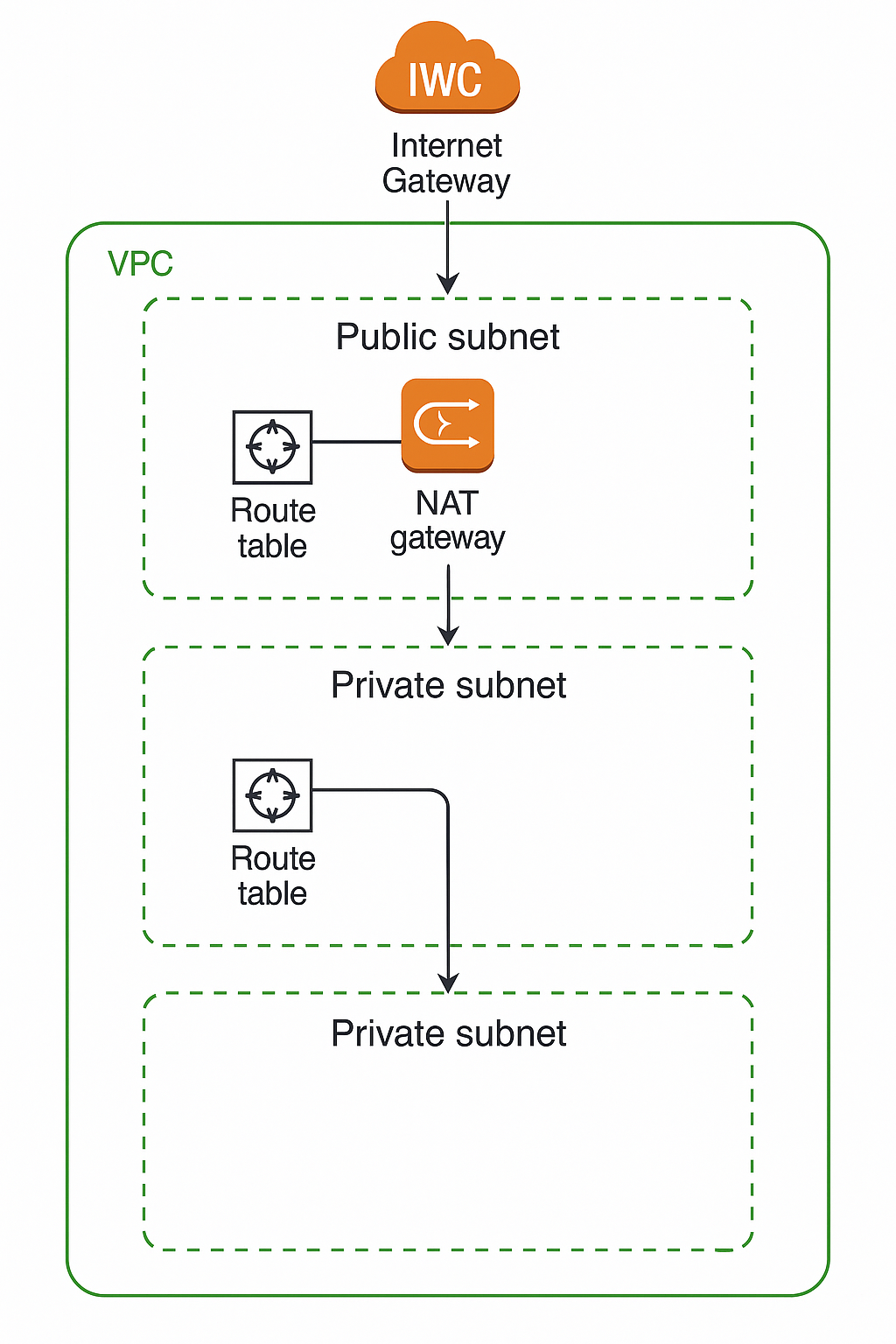
Core VPC Components
VPC and IP Addressing
A VPC is defined by its CIDR (Classless Inter-Domain Routing) block, which determines the range of IP addresses available within the network. The VPC can support both IPv4 and IPv6 addressing, with a maximum /16 IPv4 CIDR block providing up to 65,536 addresses. When creating a VPC, AWS automatically generates a default route table and default security group.
Subnets: Network Segmentation
Subnets are range of IP addresses within your VPC that allow you to organize and deploy resources in different Availability Zones. Each subnet must reside entirely within one Availability Zone and cannot span zones. This design ensures high availability and fault tolerance by distributing resources across multiple physical locations.
Subnet Types
Subnets are categorized based on their routing configuration:
Public Subnet
Has a route to an Internet Gateway
Direct internet access
Private Subnet
No direct route to Internet Gateway
Requires NAT for internet access
VPN-only Subnet
Routes only to Site-to-Site VPN connection
VPN connectivity only
Isolated Subnet
No routes to destinations outside VPC
VPC-internal communication only
Internet Gateway (IGW)
An Internet Gateway is a horizontally scaled, redundant, and highly available VPC component that enables communication between your VPC and the internet. It supports both IPv4 and IPv6 traffic without causing availability risks or bandwidth constraints. For IPv4 communication, the Internet Gateway performs Network Address Translation (NAT) by logically providing one-to-one NAT on behalf of instances.
Key characteristics of Internet Gateways:
No additional charges for the gateway itself
Horizontally scaled for high availability
Performs NAT for IPv4 traffic
Routes IPv6 traffic directly (IPv6 addresses are globally unique)
NAT Gateway
A NAT Gateway is a Network Address Translation service that allows instances in private subnets to initiate outbound connections to the internet while preventing external hosts from initiating inbound connections. NAT Gateways are created in specific Availability Zones with built-in redundancy.
NAT Gateway Types:
Public NAT Gateway: Enables private subnet instances to connect to the internet
Private NAT Gateway: Enables connections to other VPCs or on-premises networks
Performance Specifications:
Bandwidth: 5 Gbps with automatic scaling up to 100 Gbps
Packet Processing: 1 million packets per second, scaling to 10 million
Connections: Up to 55,000 simultaneous connections per IPv4 address
IP Support: Up to 8 IPv4 addresses (1 primary + 7 secondary)
Route Tables: Traffic Control
Route tables serve as the traffic controller for your VPC, containing a set of rules called routes that determine where network traffic is directed. Each route specifies a destination CIDR block and a target (such as an Internet Gateway, NAT Gateway, or VPC peering connection).
Route Table Types:
Main Route Table
Default table for all subnets
Automatically created with VPC
Custom Route Table
User-created for specific routing
Manually associated with subnets
Subnet Route Table
Associated with specific subnet
Controls subnet traffic
Gateway Route Table
Associated with gateways
Controls gateway traffic
Security Architecture
Security Groups: Instance-Level Firewalls
Security Groups act as virtual firewalls that control inbound and outbound traffic at the instance level. They are stateful, meaning that response traffic for allowed inbound connections is automatically permitted regardless of outbound rules.
Key characteristics of Security Groups:
Instance-level protection (not subnet-level)
Stateful operation - tracks connection state
Deny by default - only allows explicitly permitted traffic
Multiple groups per instance - up to 5 security groups per network interface
Cross-VPC association - can be associated with multiple VPCs in the same region
Network Access Control Lists (NACLs)
Network ACLs operate at the subnet level and provide an additional layer of security. Unlike Security Groups, NACLs are stateless, requiring explicit rules for both inbound and outbound traffic. Each VPC comes with a default NACL that allows all inbound and outbound traffic.
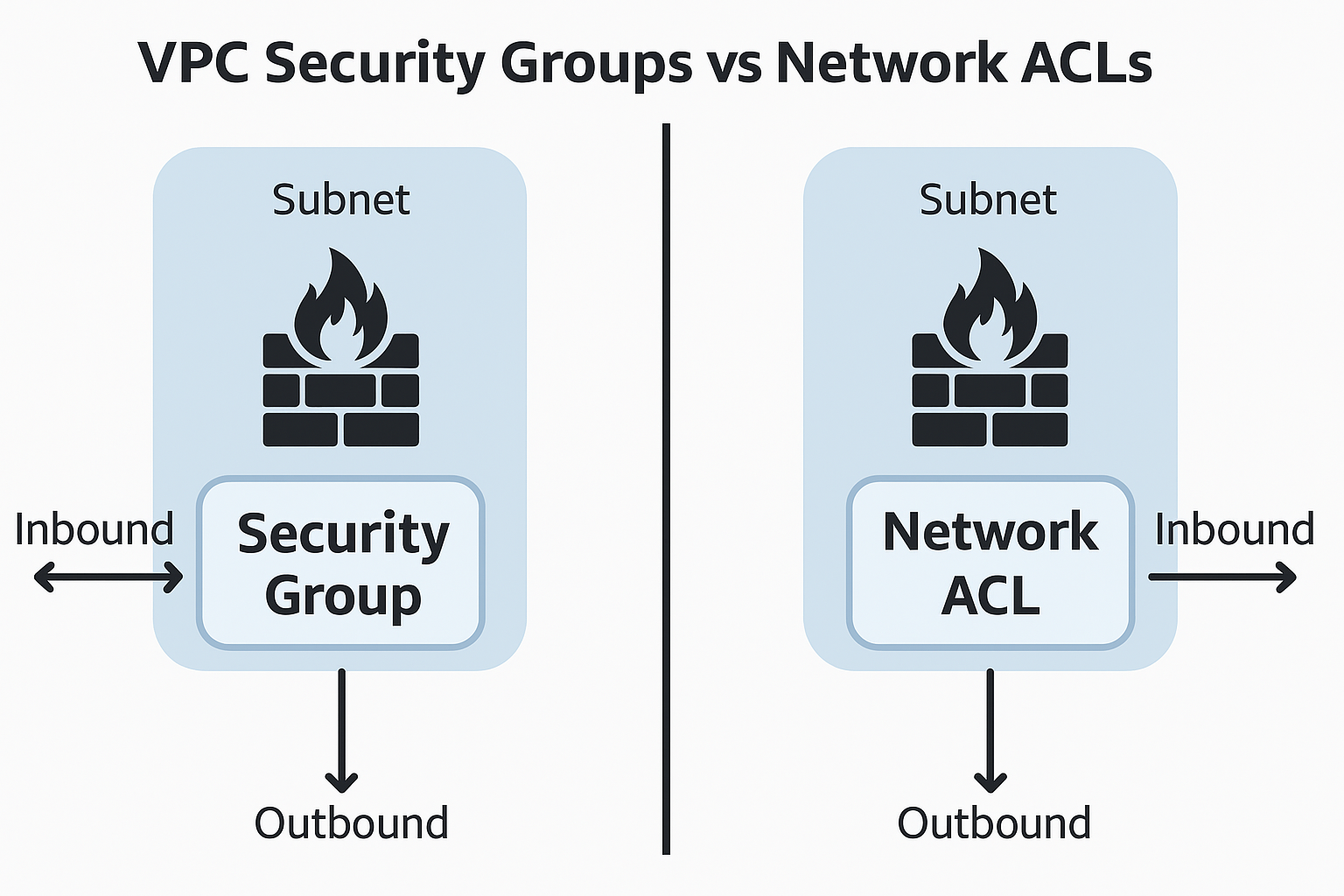
Security Groups vs NACLs Comparison
Level
Instance
Subnet
State
Stateful
Stateless
Rules
Allow rules only
Allow and deny rules
Processing
All rules evaluated
Rules processed in order
Default
Deny all inbound
Allow all traffic
Advanced VPC Features
VPC Endpoints: Private AWS Service Access
VPC Endpoints enable private connections to AWS services without requiring internet gateways, NAT devices, VPN connections, or Direct Connect. Traffic between your VPC and AWS services never leaves the AWS network backbone.
VPC Endpoint Types:
Interface Endpoints (AWS PrivateLink):
Elastic Network Interfaces with private IP addresses
Support for most AWS managed services
Hourly charges plus data processing fees
Subnet-level creation across multiple Availability Zones
Gateway Endpoints:
Route table entries for S3 and DynamoDB
No additional charges
VPC-wide accessibility
No dependency on PrivateLink
VPC Peering: Inter-VPC Communication
VPC Peering enables direct communication between two VPCs using private IP addresses as if they were on the same network. Peering connections can be established between VPCs in the same account, different accounts, or even different regions.
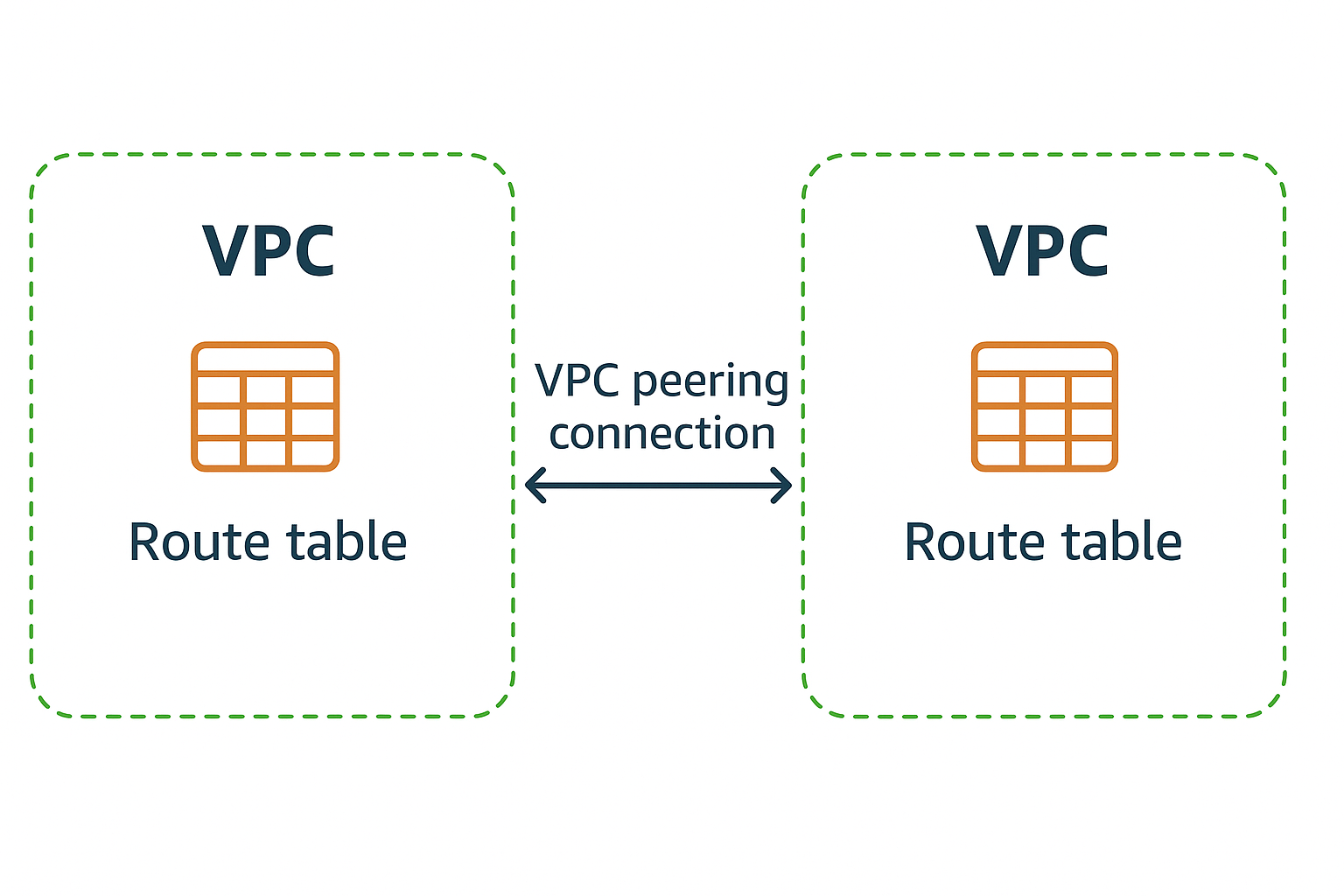
VPC Peering Process:
Key Limitations:
No transitive peering - VPCs cannot communicate through a third VPC
No overlapping CIDR blocks between peered VPCs
DNS resolution requires specific configuration for cross-VPC hostname resolution
VPC Architecture Best Practices
Multi-Tier Architecture Design
For production environments, implement a multi-tier architecture with clearly separated layers:
Public Subnets: Web servers and load balancers with internet access
Private Subnets: Application servers with controlled access
Database Subnets: Database servers with no direct internet access
High Availability and Resilience
Deploy across multiple Availability Zones for fault tolerance
Create NAT Gateways in each AZ to prevent single points of failure
Use redundant connections for critical network paths
Security Implementation
Apply principle of least privilege in security group rules
Use NACLs for subnet-level controls as defense in depth
Implement VPC Flow Logs for network monitoring and troubleshooting
Regular security group audits to maintain minimal access requirements
Cost Optimization
Use Gateway Endpoints for S3 and DynamoDB access (no charges)
Centralize Interface Endpoints across multiple VPCs when possible
Optimize NAT Gateway usage by consolidating traffic where appropriate
Practical Implementation Considerations
CIDR Block Planning
Allocate non-overlapping CIDR blocks for future VPC peering
Reserve IP space for future growth and additional subnets
Consider RFC 1918 private address ranges (10.0.0.0/8, 172.16.0.0/12, 192.168.0.0/16)
Monitoring and Troubleshooting
Enable VPC Flow Logs for comprehensive network monitoring
Use CloudWatch metrics for NAT Gateway and VPC Endpoint performance
Implement proper tagging strategies for resource organization
This comprehensive VPC architecture provides the foundation for building secure, scalable, and resilient cloud networks on AWS. Understanding these components and their interactions is essential for designing effective cloud infrastructure that meets both performance and security requirements.