
Assignment steps
Building an AWS VPC, Step-by-Step Demonstration Guide
Amazon Virtual Private Cloud (VPC) is the networking backbone of every AWS workload. The walk-through below shows—click by click—how to create a VPC, Internet Gateway (IGW), NAT Gateway, public and private subnets, and the supporting route tables. Follow these steps in the AWS Management Console (or replicate them with AWS CLI/Terraform) to give students a hands-on understanding of cloud networking.
Why This Lab Matters
By isolating back-end resources in private subnets while exposing only front-end tiers, architects reduce attack surface and control egress costs. The exercise also prepares learners for the AWS Solutions Architect exam objectives on VPC design.
Lab Topology
A single-AZ VPC (10.0.0.0/16) hosting:
Public subnet 10.0.1.0/24 for web/bastion hosts
Private subnet 10.0.2.0/24 for databases/app servers
IGW for inbound/outbound internet to public subnet
NAT Gateway for secure outbound traffic from private subnet
Two custom route tables controlling traffic paths
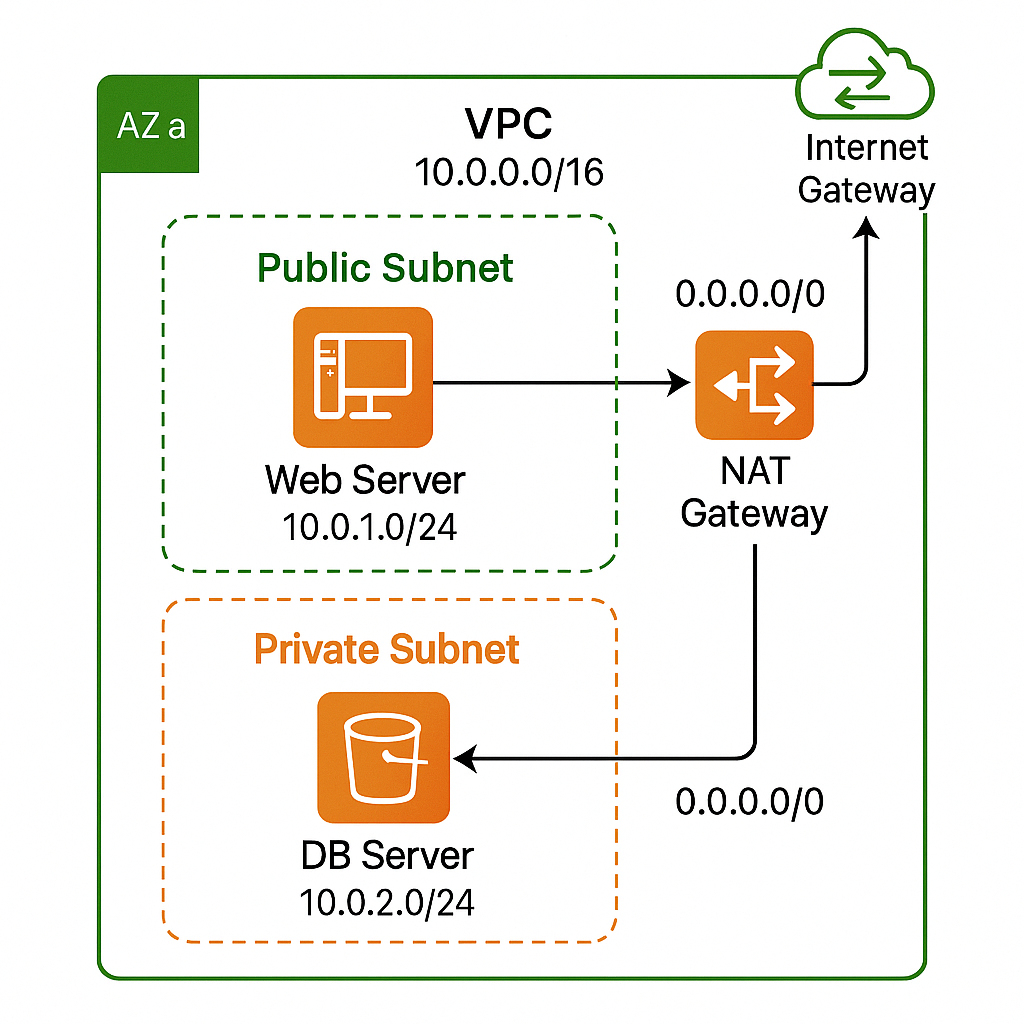
Prerequisites
AWS account with console access (IAM user with vpc*, ec2* permissions).
Default limits allow five VPCs/region; ensure capacity.
Region: us-east-1 used in screenshots; substitute as needed.
Provision Subnets
Public Subnet
Subnets → Create subnet
Select
Demo-VPC; Availability Zone:us-east-1a.Subnet CIDR: 10.0.1.0/24; Name tag:
Public-SN.Create.
Private Subnet
Repeat with Subnet CIDR 10.0.2.0/24, Name
Private-SN.
Subnet size rationale: /24 (256 IPs) is plenty for demo while leaving space for future /24 slices in 10.0.0.0/16.
Configure Route Table for Public Subnet
Route Tables → Create route table. Name:
Public-RT; VPC:Demo-VPC.Select
Public-RT→ Routes → Edit routes → Add route:Destination: 0.0.0.0/0
Target: Internet Gateway →
Demo-IGW. Save.
Subnet associations → Edit subnet associations → tick
Public-SN.
Result: Instances with a public IP in Public-SN can reach the internet and accept inbound traffic that security groups allow.
Allocate Elastic IP & Create NAT Gateway
Elastic IPs → Allocate Elastic IP → Allocate.
NAT Gateways → Create NAT gateway
Subnet:
Public-SN(must be public).Elastic IP: select the one just allocated.
Name:
Demo-NATGW.
Create; status becomes Available in ~1 minute.
Cost preview (us-east-1): $0.045/hour + $0.045/GB. Emphasize to students and remember to delete post-lab.
Route Table for Private Subnet
Route Tables → Create route table. Name:
Private-RT; VPC:Demo-VPC.Add route:
Destination: 0.0.0.0/0
Target: NAT Gateway →
Demo-NATGW.
Associate
Private-SNwithPrivate-RT.
Result: Instances in Private-SN have outbound connectivity while remaining unreachable from the internet.
Launch Test EC2 Instances
Web Server in Public Subnet
EC2 → Launch instance → Name
Web-Server.AMI: Amazon Linux 2025, t2.micro (free tier).
Network:
Demo-VPC; Subnet:Public-SN; Auto-assign public IP: Enable.Security group: allow TCP 22 (SSH) & TCP 80 (HTTP) from
0.0.0.0/0.Launch. Copy the public IPv4 address.
DB Server in Private Subnet
Launch another instance
DB-Server.Subnet:
Private-SN; Auto-assign public IP: Disable.SG: allow TCP 22 from Web-Server’s security group ID, TCP 3306 from Web-Server SG.
Note: SSH to DB requires hopping via the public instance or Systems Manager Session Manager (preferred in production).
Validate Connectivity
SSH into Web-Server (
ssh ec2-user@<public-ip>).From Web-Server,
curl amazon.comsucceeds (IGW path).ssh [email protected].<DB-private-ip>succeeds (within VPC).From DB-Server,
ping 8.8.8.8→ success via NAT Gateway.Attempt inbound SSH from laptop directly to DB-Server → fails, proving private isolation.
Real-Time Scenario: Two-Tier Web App
User Browser
Internet
HTTPS → IGW → ALB in Public-SN
Public entrypoint
App EC2
Public-SN
ALB → instance; outbound software updates via IGW
Needs global reach
MySQL RDS
Private-SN
App-SG → 3306
No direct internet exposure
Patch Scripts
Private-SN
NATGW → Yum repos
Secure outbound only
Students can deploy WordPress on Web-Server pointing to MySQL on DB-Server, then observe that breaking the NAT route blocks plugin updates while the site remains accessible.
Teaching Tips
Tie back to CIDR: show that /24 subnets 10.0.1.0/24 and 10.0.2.0/24 fit neatly inside the /16 VPC.
Demonstrate aws ec2 create-vpc, create-subnet, and associate-route-table commands or show equivalent Terraform code to instill IaC best practices.
Have students calculate monthly NAT costs for 100 GB egress and explore using VPC endpoints to avoid them.
Key Takeaways
Public subnet = route to IGW; Private subnet = no IGW route.
NAT Gateway offers outbound-only internet for private resources but incurs hourly and per-GB fees.
Route tables are the brain of the VPC; every subnet association explicitly defines traffic flow.
Proper isolation protects databases, reduces attack surface, and can lower data-transfer spend.
With these building blocks, learners can design multi-AZ architectures, add VPN/Direct Connect, or integrate VPC endpoints for a production-ready network foundation.
External Resource: Medium article by MrDevSecOps
Original article: https://medium.com/@mrdevsecops/vpcs-components-213c4977f7da
Click to view the article components summary
This Medium article organizes VPC architecture into three main categories: Core Networking Components, Security Components, and IP Address Management. Below is a concise breakdown suitable for classroom use.
Core Networking Components
Internet Gateway (IGW)
Logical connection between a VPC and the Internet.
Not a physical device; one IGW per VPC; requires manual attachment.
No explicit bandwidth limits (limited by EC2 sizes).
AWS Router and Route Tables
Router uses route tables to direct traffic.
Route table fundamentals: Destination/Target pairs, one route table per subnet association (a subnet associates with one route table).
Default local route present in every route table.
Main vs Custom route tables: Main is default for unassociated subnets; custom is explicitly associated.
NAT Gateway
Enables outbound internet for private instances while blocking inbound connections.
Resides in public subnets and requires an Elastic IP.
IPv4 only; use egress-only IGW for IPv6.
Subnets
Public subnets: associated with route tables that point to IGW.
Private subnets: route to NAT Gateway; no direct inbound internet access.
Private resources accessed via VPN or bastion/SSM.
Security Components
Security Groups
Instance-level, stateful firewalls.
Only allow rules (no explicit deny); default allows all outbound.
Flexible per-instance assignment.
Network ACLs (NACLs)
Subnet-level, stateless firewalls (must allow both directions explicitly).
Default NACL allows all IPv4; custom NACLs deny by default until configured.
Complement security groups for layered defense.
VPC Flow Logs
Captures network traffic metadata for troubleshooting and monitoring.
Can log at VPC, subnet, or network interface level; integrates with CloudWatch.
Not real-time streaming; useful for diagnostics.
IP Address Management
Private IP Addresses
Used for internal VPC communication; not reachable from the internet.
Assigned automatically; persistent across stop/start; released on termination.
Secondary private IPs can be attached and moved.
Public IP Addresses
Temporary internet-accessible addresses assigned from AWS pool.
Assignment depends on subnet/public IP settings; non-persistent.
Elastic IP Addresses
Static, persistent public IPs allocated to an account.
Transferable between instances/VPCs (same account).
Charged when allocated but unused or attached to stopped instances.
Teaching Applications & Assessment Ideas
Use the article for pre-lab reading and in-session reference.
Create assessment questions such as:
Why must a NAT Gateway be in a public subnet?
Compare stateful Security Groups vs stateless NACLs.
When to choose Elastic IP vs Public IP?
If you want, I can extract specific command examples (AWS CLI or Terraform) that parallel each console step, or produce a printable lab worksheet for students. Which would you prefer?