
S3 bucket policies
Amazon S3 (Simple Storage Service) bucket policies are a way to control access to your S3 buckets and their contents. These policies are written in JSON format and define the permissions and restrictions for different users, groups, or applications interacting with the S3 bucket. Here’s a brief overview:
JSON-Based Policies:
S3 bucket policies are expressed in JSON (JavaScript Object Notation) format, providing a structured and readable way to define access controls.
2. Access Control Elements:
Principals: Specifies the AWS accounts, IAM users, IAM roles, federated users, or AWS services to which the policy is applied.
Actions: Defines the specific operations (e.g., GetObject, PutObject) that are allowed or denied.
Resources: Identifies the Amazon S3 resources (e.g., buckets, objects) to which the policy applies.
Conditions: Optionally includes conditions that must be satisfied for the policy to take effect.
3. Common Use Cases:
Public Access: Define policies to allow or deny public access to the entire bucket or specific objects within it.
Cross-Account Access: Grant permissions to AWS accounts other than the account that owns the S3 bucket.
IAM User and Role Access: Specify permissions for IAM users and roles within the same AWS account.
Restricting Access by IP: Set up policies to allow access only from specific IP addresses or ranges.
4. Policy Structure:
Policies consist of statements, each containing an “Effect” (Allow or Deny), a list of “Actions,” a list of “Resources,” and optional “Conditions.”
5. Bucket and Object Policies:
Bucket policies apply to the entire bucket, while access control lists (ACLs) and bucket policies can be used to control access to individual objects within the bucket.
6. Testing and Evaluation:
Use the AWS Policy Simulator or the IAM Policy Simulator to test and evaluate the effectiveness of your policies before applying them.
7. AWS Best Practices:
Follow AWS best practices, such as the principle of least privilege, to ensure that your policies grant only the necessary permissions.
8. Versioning and Logging:
Enable versioning on your S3 bucket to track changes to your policies over time. Additionally, enable logging to capture detailed information about access to your bucket.
9. AWS Documentation and Examples:
AWS provides extensive documentation and examples for crafting S3 bucket policies. Reference these resources to create effective and secure policies.
Understanding and properly configuring S3 bucket policies is crucial for securing your data and controlling access within your AWS environment. Regularly review and update policies to align with changing security requirements and access patterns.
#AWS #S3 #SecurityPolicies 🛡️🔐
Let’s It Practically
Bucket policy
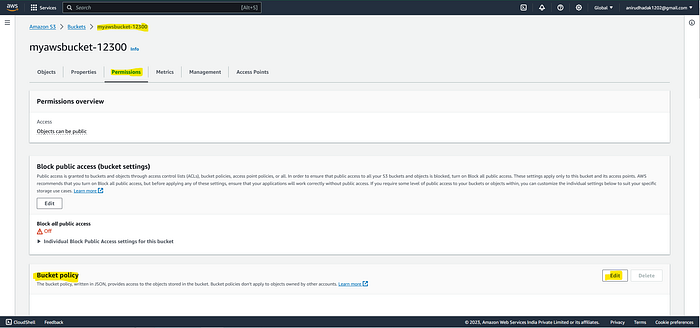
*Bucket > permission > edit bucket policy policy generator
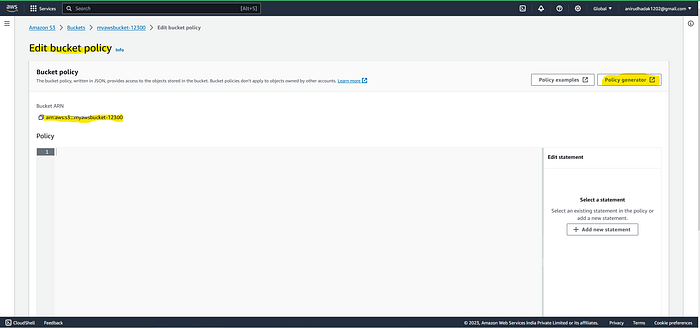
copy : Bucket ARN
=> policy Generator Step1. Select policy type => s3 bucket policy Step2. statement — effect = Deny principle : * Action -: Delect bucket Amazon Resource Name: ARN = [ ] Add Statement Generate policy : copy policy Json document paste in Edit Bucket policy [Save changes]
— — — — — — — — — — — — — — — — — — — — — — — — — -
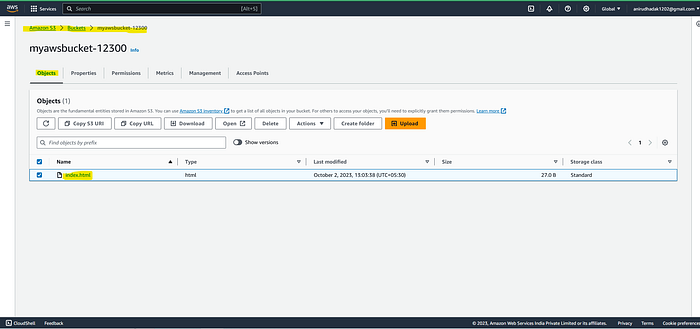
In This Bucket the ‘index.html’ object is uploaded
Press enter or click to view image in full size
In Bucket permissions > Bucket Policy is there click on ‘Edit’
This Passage will open so click on ‘Policy generator’
The another web console in open that is AWS Policy Generator
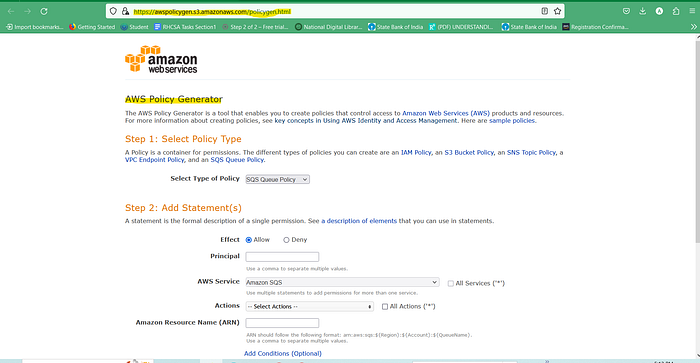
Step 1 Type of Policy : S3 bucket Policy
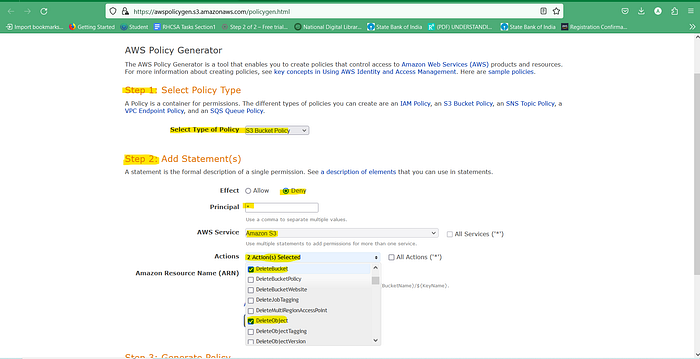
Step2 : Add Statement
Step2. statement — effect = Deny principle : * Action -: Delect bucket Amazon Resource Name: ARN = [ ]
Add Statement Generate policy : copy policy Json document paste in Edit Bucket policy [Save changes]
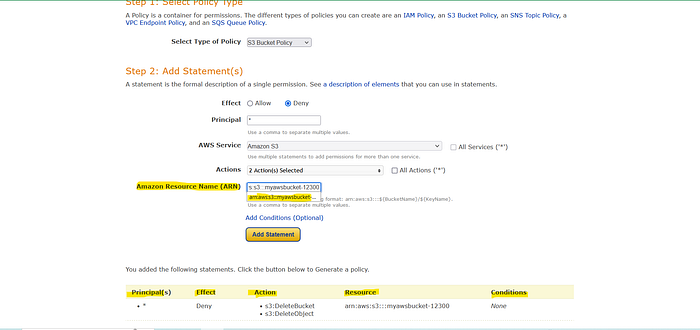
Now save changes , Copy Generated Json script
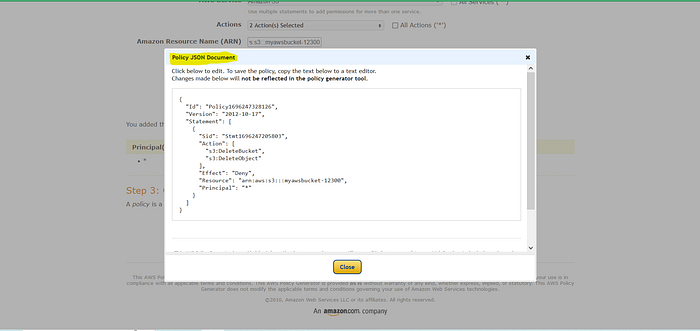
Paste it into the Edit Bucket Policy
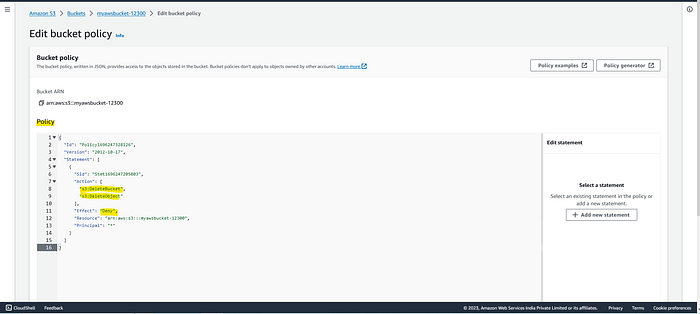
the Json Document should be copy properly.
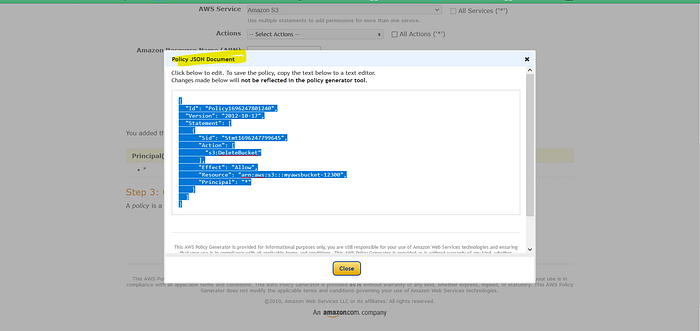
Save it in Bucket Policy.
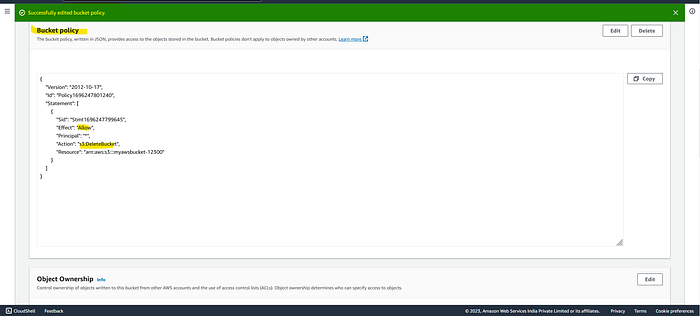
Now , try to delete bucket → you don’t have permission to delete bucket due to deny policy , deny to delete.
To delete bucket Bucket > permission delete the bucket policy then the No Policy available Now you can delete policy.
Last updated