
version control systems
Last Updated: 06 Mar, 2025
Version Control Systems
Version Control Systems (VCS) are essential tools used in software development and collaborative projects to track and manage changes to code, documents, and other files. Whether you're working alone or as part of a team, version control helps ensure that your work is safe, organized, and easy to collaborate on.
In this article, we explore the concept of Version Control Systems, their importance, the types available, and how to effectively use them in development projects.
What is a Version Control System?
A Version Control System (VCS) is a tool that helps track and manage changes to a project's codebase over time.
It allows multiple developers to work on the same project simultaneously without conflicts, maintains a history of all changes, and enables easy rollback to previous versions if needed. VCS ensures collaboration, code integrity, and efficient management of software development.
Why is the Version Control System Important?
Using a version control system brings several significant advantages to developers and teams:
Track Changes Over Time: VCS allows developers to track every modification made to the codebase. You can always go back to previous versions, ensuring no changes are lost.
Collaboration: VCS simplifies collaboration between team members. Everyone can work on different parts of the project without worrying about overwriting each other's work.
Code History and Audit Trails: See who made specific changes, when they were made, and why. This audit trail is invaluable for debugging, reviewing, or maintaining code.
Backup and Recovery: VCS offers a way to back up your project. If something goes wrong, you can recover previous versions.
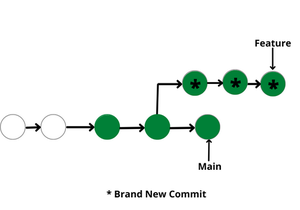
Branching and Merging: Create branches for different features or bug fixes, allowing multiple developers to work simultaneously without interfering with each other’s code. Branches can be merged back into the main project when ready.
Types of Version Control Systems
There are two main types of Version Control Systems: Centralized Version Control Systems (CVCS) and Distributed Version Control Systems (DVCS).
Centralized Version Control Systems
Centralized version control systems contain a single global repository, and every user commits to that central repository to reflect changes. Others see your changes by updating.
Two things are required to make your changes visible to others:
You commit
They update
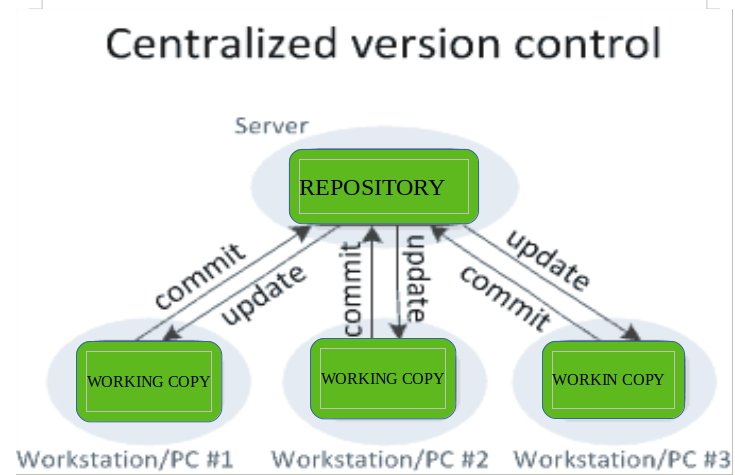
Benefits and trade-offs:
The benefit of CVCS is simpler collaboration and some insight into what others are doing on the project.
Administrators can apply fine-grained control over who can do what.
The most obvious downside is the single point of failure: if the centralized repository goes down, collaboration and saving versioned changes is not possible.
Advantages of CVCS
Simplicity in setup and management.
Easy to maintain a single central repository.
Suitable for small teams or projects with limited collaboration needs.
Disadvantages of CVCS
If the central server goes down, no one can commit or retrieve updates.
Limited support for branching and merging compared to DVCS.
Can become a bottleneck if many developers are committing simultaneously.
Distributed Version Control Systems
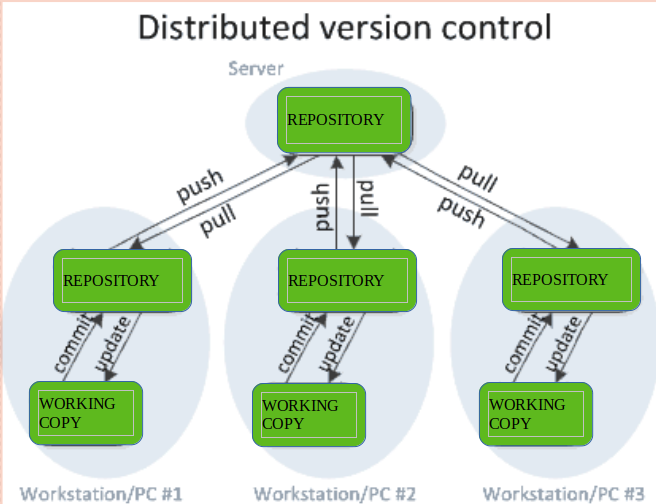
Distributed version control systems contain multiple repositories. Each user has their own repository and working copy. Committing your changes only updates your local repository; you must push to make them visible centrally.
To make your changes visible to others:
You commit
You push
They pull
They update
The most popular distributed version control systems are Git and Mercurial. They help overcome the single point of failure problem.
Advantages of DVCS
Allows developers to work offline and commit changes locally before syncing.
Better handling of branches and merges.
Faster access to version history since developers don’t rely on a central server.
More resilient: if one copy of the repository is lost, it can be recovered from others.
Disadvantages of DVCS
More complex setup and configuration.
Can require more storage space since each developer has a full repository.
Potentially higher bandwidth usage when pushing and pulling from central servers.
Popular Version Control Systems
Git
Git is the most widely used Distributed Version Control System, developed by Linus Torvalds in 2005 for managing the Linux kernel. It is highly efficient, supports branching and merging, and has a fast, decentralized workflow. Git is the backbone of services like GitHub, GitLab, and Bitbucket.
Key Features of Git
Lightweight, fast, and efficient.
Branching and merging are simple and non-destructive.
Provides powerful commands like git clone, git pull, and git push.
Subversion (SVN)
Subversion is a popular centralized version control system. While not as commonly used in open-source projects today, SVN is still used by many organizations for its simplicity and centralized nature.
Key Features of SVN
Single central repository.
Supports branching and tagging but is less flexible than Git.
Versioning of files and directories.
Mercurial
Mercurial is another distributed version control system similar to Git but with a simpler interface. It is well-suited for both small and large projects and is used by companies like Facebook and Mozilla.
Key Features of Mercurial
Simple, fast, and scalable.
Supports branching and merging.
Includes tools for managing project history and changes.
Benefits of Using a Version Control System
Version control systems (VCS) offer several benefits crucial for effective collaboration and managing the lifecycle of software development projects:
Enhanced Collaboration: Multiple developers can work on the same project without conflicts by using branches and merging changes seamlessly.
Track Changes: Every change is recorded with a detailed history, allowing easy rollback and audit trails.
Branching & Merging: Work on new features or fixes in isolated branches and merge them back into the main project later.
Backup & Recovery: VCS ensures automatic backups, allowing recovery of previous versions if something goes wrong.
Improved Code Quality: Code reviews and tracked changes help maintain quality and consistency.
Efficient Remote Collaboration: Teams can work offline and sync later, enabling collaboration across geographies.
Continuous Integration: Automates testing and deployment, reducing errors and speeding up delivery.
Better Project Management: Keeps track of milestones, commits, and progress, improving project visibility.
Security: Provides role-based access and clear logs for security audits.
Use of Version Control Systems
VCS are essential tools for managing changes to a project’s codebase, especially in collaborative environments.
Tracking Changes: VCS records who made changes, what was changed, and when it was made. This allows monitoring of code evolution and reverting to previous versions if needed.
Collaboration: Multiple developers can work on the same project without overwriting each other's work. Branches allow independent work on tasks or features and later merging into the main project.
Conflict Resolution: When changes conflict, VCS tools help identify and resolve conflicts to keep the code consistent and functional.
Backup and Recovery: VCS acts as a backup system. If an error occurs, previous versions of the code can be recovered.
Testing Without Risk: Create isolated branches to test new features or bug fixes without affecting the main codebase. Verified changes can later be merged.
Continuous Integration: VCS supports continuous integration, allowing regular integration of code changes so the software remains in a deployable state.
Last updated